

FastAPI had quickly become one of the most popular frameworks for building modern APIs. Its speed, simplicity, and support for asynchronous programming is next level. But, Even the fastest framework can struggle when our application grows and database queries become more complex, or our APIs hit with thousands of requests per second.
This is where caching comes in..
Caching is like giving our application a memory. Instead of repeatedly fetching the same data from our database or performing expensive computations, we can store the results temporarily and serve them instantly whenever the same request has triggered again. This will results - Lightening fast responses, reduced server load, and a smoother experience for users.
In this blog, we will explore:
- What caching is and why it matters in FastAPI
- Different caching strategies (in-memory, Redis)
- Practical examples with and without caching
What is Caching?
Caching is a technique to temporarily store data that is expensive to fetch or compute, so the next time you need it, you can retrieve it quickly without repeating the same heavy work.
Instead of always querying a database, calling an API, or recalculating results, the system keeps a "shortcut copy" of the result in a faster storage layer (like memory or Redis).
Why caching is powerful ?
- Reduces computation → No need to repeat complex calculations.
- Reduces latency → Fetching from memory (nanoseconds–milliseconds) is way faster than querying a DB (milliseconds–seconds).
- Improves scalability → Applications handle more users without overwhelming servers.
- Better user experience → Faster responses feel "instant" to users.
Different caching strategies in FastAPI
When it comes to caching in FastAPI, we generally have two main approaches are in-memory caching and distributed caching. Each has its own use cases and trade-offs:
1. In-Memory Cache (Local)
This is the simplest and fastest form of caching. You can store frequently used data directly in memory using Python dictionaries or tools like functools.lru_cache.
- Pros: Extremely fast since everything is stored in RAM.
- Cons: The cache disappears if the server restarts, and it only works for a single process , not suitable when we scale our app across multiple workers or servers.
This is great for small-scale projects, prototyping, or situations where you only need temporary caching.
Practical Example: With ( In-Memory Cache) vs Without Cache
Here’s the demo I ran on my local machine with 13M+ records in borrower_payments table
import time
from functools import lru_cache
from fastapi import FastAPI

import psycopg2

from psycopg2.extras import RealDictCursor


app = FastAPI()


def get_connection():

return psycopg2.connect(

dbname="your_db",

user="postgres",

password="your_password",

host="localhost",

port="5432",

cursor_factory=RealDictCursor

)


# --- Without Caching ---

@app.get("/fetch_without_cache")

def fetch_without_cache():

start_time = time.perf_counter()

conn = get_connection()

cur = conn.cursor()

cur.execute("SELECT * FROM borrower_payments

where investor_id = 'DEMO_INV' and transaction_date between '2023-01-31' and  '2024-01-31' limit 100000")

rows = cur.fetchall()

conn.close()

end_time = time.perf_counter() # end time

print(f"Time without cache: {end_time - start_time:.4f} seconds")

return {"rows_fetched": len(rows), "time_taken": end_time - start_time}

 # --- With Caching ---

@lru_cache(maxsize=1)

def cached_query():

conn = get_connection()

cur = conn.cursor()

cur.execute("SELECT * FROM borrower_payments where investor_id = 'DEMO_INV' and transaction_date between '2023-01-31' and  '2024-01-31' limit 100000")

rows = cur.fetchall()

conn.close()

return rows


@app.get("/fetch_with_cache")

def fetch_with_cache():

start_time = time.perf_counter()

rows = cached_query()

end_time = time.perf_counter()

print(f"⚡ Time with cache: {end_time - start_time:.6f} seconds")

return {"rows_fetched": len(rows), "time_taken": end_time - start_time}
maxsize=1 means it will only cache one unique query (the latest one).
If we query the same investor and transaction_date again, it’s instant (from cache).
If we change the query parameters (say another transaction_date), the cache will drop the old one and store the new one.
Best practices for maxsize:
- Use a small number (1–10) if your query results are very large (to save memory).
- Use a larger number (like 128, 512, or None) if queries are smaller and you want to cache more unique inputs.
- maxsize=None means unlimited cache size (careful: can cause memory bloat).
Output:
- Without cache → ~11.96s (direct DB query).
- First cache call → ~11.04s
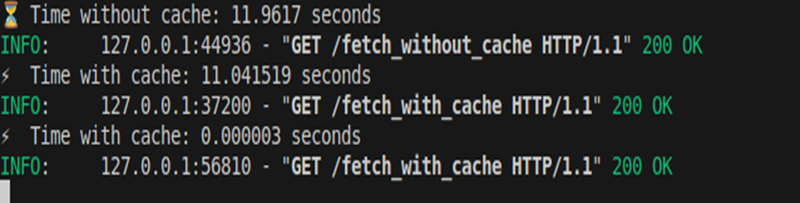
Second cache call → ~0.000003s (cache hit, served instantly from memory).
2. Distributed Caching with Redis
Unlike in-memory cache (stored inside your FastAPI process), distributed caching stores data in an external cache server like Redis or Memcached
Pros:
- Cache survives server restarts and deployments.
- Shared across multiple FastAPI workers or microservices, which makes it ideal for scaling.
- Can handle much larger datasets than in-process memory.
Cons:
- Slightly slower than in-memory caching since it involves a network call.
- Requires running and maintaining an external Redis server.
- More setup complexity compared to in-memory solutions.
This makes Redis a production-ready caching solution, especially for high-traffic, distributed systems.
How Redis Improves Caching
- First request → API fetches from DB → result is saved in Redis.
- Second+ requests → API fetches directly from Redis → super fast.
Practical Example: With (Redis Cache) vs Without Cache
Here is the example ran in my local machine
import time

import psycopg2

from psycopg2.extras import RealDictCursor

from fastapi import FastAPI

import redis

import json


app = FastAPI()


# DB Connection

def get_connection():

return psycopg2.connect(

dbname="your_database_name",

user="postgres",

password="your_password",

host="localhost",

port="5432",

cursor_factory=RealDictCursor

)


# Redis Connection

redis_client = redis.Redis(host="localhost", port=6379, db=0)
# Without Caching

@app.get("/redis_without_cache")

def fetch_without_cache():

start_time = time.perf_counter()

conn = get_connection()

cur = conn.cursor()

cur.execute("SELECT * FROM  borrower_payments WHERE investor_id='DEMO_INV' AND transaction_date between '2023-01-31' and  '2024-01-31' LIMIT 100000")

rows = cur.fetchall()

conn.close()

end_time = time.perf_counter()

elapsed = end_time - start_time

print(f" [WITHOUT REDIS] Time: {elapsed:.4f}s")

return {"rows_fetched": len(rows), "time_taken": elapsed}


# With Redis Caching

@app.get("/redis_with_cache")

def fetch_with_redis_cache():

cache_key = "cstsrc:DEMO_INV:2023-01-31:100000"

# 1️. Check cache first

start_time = time.perf_counter()

cached_data = redis_client.get(cache_key)

if cached_data:

end_time = time.perf_counter()

elapsed = end_time - start_time

print(f"⚡ [WITH REDIS CACHE] Cache Hit, Time: {elapsed:.6f}s")

return {"rows_fetched": len(rows), "time_taken": elapsed, "source": "redis"}


# 2️. If cache miss, fetch from DB

conn = get_connection()

cur = conn.cursor()

cur.execute("SELECT * FROM borrower_payments WHERE investor_id='DEMO_INV' AND transaction_date between '2023-01-31' and  '2024-01-31' LIMIT 100000")

rows = json.loads(cached_data)

rows = cur.fetchall()

conn.close()


# Store in Redis with TTL (60 sec)

redis_client.setex(cache_key, 60, json.dumps(rows, default=str))


end_time = time.perf_counter()

elapsed = end_time - start_time

print(f" [WITH REDIS CACHE] Cache Miss (DB Hit), Time: {elapsed:.4f}s")

return {"rows_fetched": len(rows), "time_taken": elapsed, "source": "db"}
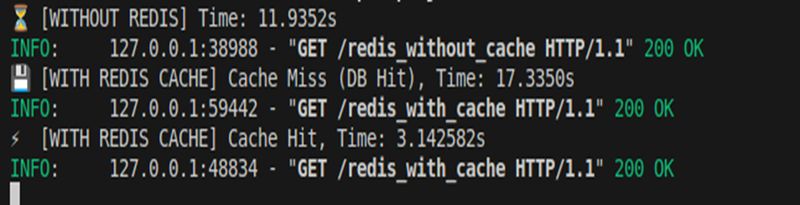
Output:
Without cache → ~11.93s (direct DB query).
- First Redis call → ~17.33s (cache miss, still DB hit + store to Redis).
- Second Redis call → ~3.14s (cache hit from Redis, much faster than DB).
Conclusion
Caching is one of the easiest and most effective ways to boost FastAPI’s performance. With in-memory caching, we get blazing-fast lookups for small-scale apps, while Redis brings durability, scalability, and advanced features that make it ideal for production workloads. By reducing database load and speeding up response times, caching ensures our APIs remain smooth and reliable even under heavy traffic.
Whether one can start simple with lru_cache or scale out with Redis, the key takeaway is clear: a smart caching strategy can turn a good FastAPI app into a truly high-performing one.