
A few weeks ago, we began modernising one of our reusable dropdown components by migrating it to OnPush change detection and Angular Signals.
The goal was straightforward: improve performance, simplify state management, reduce lifecycle dependencies, and make the component more predictable and maintainable.
Everything went smoothly until we encountered an edge case that completely froze the browser tab.
No Angular error. No TypeScript error. Not even a helpful console warning. Just an unresponsive screen where we couldn't click anything.
The issue led us to reconsider how we were using Angular's effect() and understand the consequences of introducing side effects into reactive state management.
In this article, we'll explore how Angular effect() works, where it fits into real-world applications, common mistakes to avoid, and the lessons we learned during our migration.
The Challenge: Migrating a Dropdown Component to Angular Signals
A common requirement in our forms was to dynamically populate one field based on the value selected in another.
For example, consider two dependent dropdowns: Country and State.
When a user selects a country, the State dropdown should automatically update to display only the states applicable to that country.
In our earlier implementation, we handled this dependency using Angular's ngOnChanges lifecycle hook. The component monitored changes to its input properties and updated the dependent dropdown accordingly.
As part of our modernisation effort, we began replacing this input-based logic with Angular Signals to make the component more reactive and reduce its reliance on lifecycle hooks.
How an Unintended Feedback Loop Caused the UI to Freeze
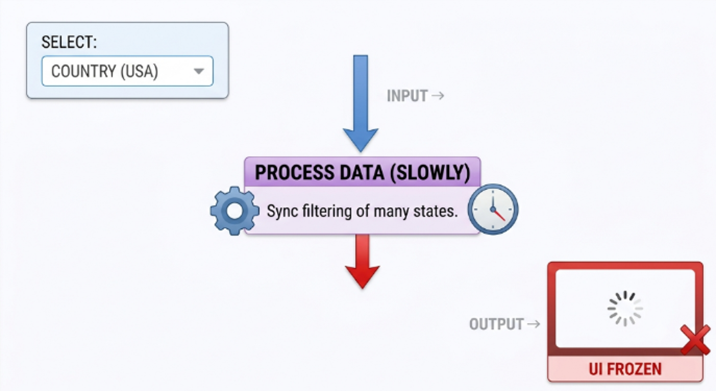
Cascade Effect & UI Freeze Sequence
As part of the migration, we started replacing some of the existing input and lifecycle-based logic with Signals. The idea was straightforward: instead of manually detecting changes and synchronising dependent values, we wanted the component to respond naturally whenever its reactive state changed.
We started by converting inputs such as the dropdown options into signal-based inputs:
options = input<Array<string> | any>([]);
While refactoring the component, we also introduced effect() to handle some of the synchronisation logic. That's where we ran into an unexpected issue.
One of the effects was unintentionally creating a feedback loop. The effect was reacting to a signal change and, as part of its execution, updating reactive state that caused the same effect to run again.
This created a repeated execution cycle that eventually froze the browser tab.

Angular Effect Feedback Loop
What Exactly Is an Angular effect()?
Once we started investigating why our dropdown logic was behaving the way it did, the first thing we needed to understand was what an Angular effect() actually does.
An effect() is a reactive function that Angular automatically reruns whenever a signal read inside the effect changes.
The important part is that Angular doesn't require us to explicitly specify which signals to watch. It determines the dependencies by tracking the signals accessed while the effect executes.
The flow is simple:
- Effect is created: Angular runs it for the first time.
- Signals are read: Angular tracks those signals as dependencies.
- A dependency changes: Angular runs the effect again
For example:
constructor() {
  effect(() => {
    console.log(this.options());
  });
}
Here, options() becomes a dependency of the effect. Whenever options changes, the effect runs again.
In simple terms, an effect automatically responds to changes in the signals it depends on. This eliminates the need to manually track every dependency.
This automatic dependency tracking is what makes effect() powerful. But it also means we need to be careful about what we read and modify inside an effect, especially when the effect updates reactive state that it depends on.
Why Did Angular Introduce effects()?
Before Signals, many Angular applications handled reactive behaviour using:
- subscribe()
- ngOnInit / ngOnChanges
- Event emitters
- Manual synchronisation between state and UI
Example of the old approach:
ngOnInit(): void {
  this.countryControl.valueChanges.pipe(takeUntilDestroyed()).subscribe(country => {
    this.loadStates(country);
  });
}
This approach often introduces problems:
- Nested subscriptions
- Manual unsubscription logic
- Memory leaks
- Harder debugging
- Too much RxJS for simple state updates
Signals improve fine-grained state management. effect() was introduced for the remaining cases: something needs to happen because state changed, especially when that something is outside pure derivation.
What we got wrong early on was treating "something needs to happen" as "always use effect()", including cases that were still just derived state or form-driven workflow.
computed() vs effect():
One of the most important lessons from our migration was understanding when to use computed() and when to use effect().
Use computed() for Derived Values
A computed value is synchronous. It derives a value from Signals and should remain pure. It should not be used for emitting events, making API calls, or writing to other signals simply to keep values mirrored.
availableOptions = computed(() =>
  this.options().filter(option => option.active)
);

displayLabel = computed(() => {
  const selected = this.selectedValue();
  return this.options().find(o => o.value === selected)?.label ?? '';
});
Ideal use cases:
- Filtering lists
- Derived labels
- UI flags
- Transforming state
Use effect() for External Behaviour
An effect is useful when a signal change needs to trigger an action outside pure value derivation.
effect(() => {
  const open = this.open();
  this.overlayApi.setOpen(open);
});
Ideal use cases:
- Local Storage updates
- Logging
- Form synchronisation bridges
- Third-party integrations
- Narrow change-detection /observable bridges
Not ideal for:
- Clearing dropdown values by emitting on every options change.
- Copying one Signal into another as architecture.
- Replacing all ngOnChanges logic wholesale.
computed() vs effect(): Quick Comparison
| Comparison | computed() | effect() |
|---|---|---|
| Purpose | Derives values | Handles side effects |
| Behaviour | Calculates a value |
Executes when dependencies change |
| Best suited for | Derived state | External operations |
| Example | Filtering dropdown options | Updating Local Storage |
| Side effects | Should remain pure | Designed for side effects |
The key takeaway is simple: use computed() when you need to calculate a value, and use effect() when you need to perform an action in response to a signal change.
Practical Use Cases of Angular Effects
While our initial implementation caused problems, there were other situations where effects provided a useful solution.
Angular Forms + OnPush Bridge
We needed Signal-friendly status for templates under OnPush. Subscribing once in an effect (with cleanup) bridged statusChanges into a Signal.
private readonly statusEffect = effect((onCleanup) => {
  const sub = this.control.statusChanges.subscribe(status => {
    this.status.set(status);
  });

  onCleanup(() => sub.unsubscribe());
});
Why this works well:
- Bridges reactive forms with Signals.
- Works well with OnPush when the template reads status().
- Prevents leaks using onCleanup.
Re-subscribing When an Input Changes
When Country changed, we needed a new states request and disposal of the previous in-flight subscription.
private readonly statesEffect = effect((onCleanup) => {
  const country = this.country();

  const sub = this.stateApi.loadStates(country).subscribe(states => {
    this.states.set(states);
  });

  onCleanup(() => sub.unsubscribe());
});
This ensures old subscriptions are cleaned up when the dependency changes or the component is destroyed.
Local Storage Synchronisation
This is a clean, valid side effect: Signal → external system.
The signal's value is synchronised with Local Storage without writing back into the same Signal graph.
effect(() => {
  localStorage.setItem('theme', this.theme());
});
Imperative UI Bridge (Dropdown Overlay)
Sometimes, a signal change needs to trigger an imperative UI operation, such as interacting with a dropdown overlay.
This is the kind of synchronisation computed() cannot do because the destination is imperative.
effect(() => {
  this.overlay.setOpen(this.open());
});
What Is allowSignalWrites?
By default, Angular blocks Signal writes inside an effect. This helps prevent circular updates where an effect reads a Signal, writes to another Signal, and retriggers itself.
allowSignalWrites: true opts out of that guard when you intentionally synchronise one Signal into another.
effect(() => {
  const incoming = this.displayTable();

  if (this.localDisplayTable() === incoming) return;

  this.localDisplayTable.set(incoming);
}, { allowSignalWrites: true });
Use it only with a no-op guard. If you only need a derived value, use computed() instead.
Important consideration: Enabling Signal writes inside effects should not be a default approach. Use it only when there is a specific requirement and the update logic prevents unnecessary repeated writes.
This is an escape hatch, not a default.
Best Practices for Using Angular Effects
Based on our migration experience, here are some practical guidelines to follow when working with Angular effects.
Prefer computed() for Derived State
Use computed() for options filters, labels, flags, and transformed lists.
Keep Effects Short
Each effect should have one clear purpose. A large effect usually indicates that the state design needs improvement.
Guard Signal Writes and Emits
- Check whether the value has actually changed.
- Avoid unnecessary UI resets on new array references.
- Prevent feedback loops.
Always Clean Up Subscriptions
If you subscribe inside an effect, use onCleanup to ensure subscriptions are properly disposed of.
Avoid Effect Chaining
Avoid unnecessary dependencies between multiple effects.
For example:
Effect A writes B → Effect B writes C → Effect C writes A.
This is where things become dangerous, and where we saw freezes without exceptions.
Don't Use effect() as a Blanket ngOnChanges Replacement
Migrate derivations first. Add effects only for side effects you can explain in one sentence.
Conclusion: Keep Angular Effects Simple and Intentional
Angular effect() is useful for handling side effects, but improper signal updates can create unexpected feedback loops.
Use computed() for derived values, Reactive Forms for form-related workflows, and effect() for tasks such as Local Storage synchronisation and external API interactions.
Keep effects focused and avoid unnecessary state mutations to maintain predictable applications.
Have you faced unexpected behaviour while working with Angular Signals? Share your experience in the comments.