A practical guide for backend, DevOps and security engineers building upload pipelines on AWS that stay safe at scale.
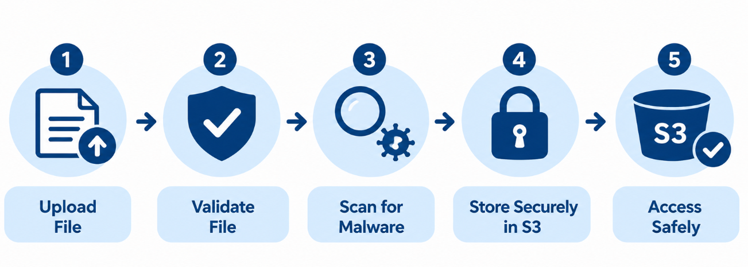
Secure File Upload Workflow on Amazon S3
Every upload button is a door into your system. You hand a stranger a form field, and they hand you back an arbitrary blob of bytes that you promise to store, process and serve to other people.
The first version is easy: accept a file, call put_object, return a URL. It works in the demo. Then traffic grows, someone uploads a 4 GB video to an endpoint built for profile pictures, a "PDF" turns out to be an HTML page that runs scripts in your users' browsers, and a bucket you forgot was public shows up in a breach report.
This article walks through how to design upload systems on Amazon S3 that hold up under both attack and load. You will learn:
- What "secure" actually means for a file upload
- The six attacks every upload endpoint must expect
- Why the naive "upload through the API server" design breaks at scale
- A reference architecture using pre-signed URLs, a quarantine bucket and asynchronous scanning
Working Python (FastAPI + boto3) code for each step, plus a launch checklist
What makes a file upload "secure"?
A secure upload system accepts, stores and serves files without letting any single file harm the application, its infrastructure or its other users. The key mental shift: a file is untrusted input, exactly like a form field or a query parameter, only far bigger and far harder to inspect.
A JSON field has a schema you can validate in microseconds. A file can be a 2 GB payload, a polyglot that is valid as both a JPEG and a JavaScript file, a ZIP that expands to petabytes, or an image with malicious metadata. Treat every file as hostile until it has been checked, and design so that an unchecked file can never reach a place where it could do damage.
In practice, a secure system guarantees five things:
- Only expected file types get in, judged by content, not by name or client-supplied headers.
- Size and volume are bounded, per file and per user.
- Storage is private and isolated, with keys the server controls.
- Access is authorized and time-limited, never public by default.
Every file is traceable: who uploaded it, when, where it lives and what state it is in
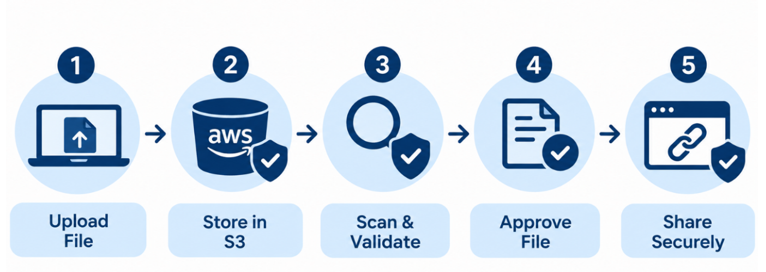
Secure Access Authorization Process
Six Common Security Threats in File Upload System
Before designing defenses, name the attacks. These six cover the vast majority of real-world upload incidents.
| Attack | What happens | Primary defense |
|---|---|---|
| Malicious content |
Malware, macros or scripts are stored and later opened by users or processed by your workers |
Quarantine + malware scanning before release |
| Type spoofing | invoice.exe is renamed invoice.pdf, or the Content-Type header is simply forged |
Validate magic bytes, not names or headers |
|
Resource exhaustion |
Huge files or decompression bombs exhaust memory, disk or bandwidth |
Enforce size limits at S3 and stream, never buffer |
|
Unauthorized access |
Guessable or public URLs expose private files |
Private bucket, ownership checks, short-lived URLs |
| Storage abuse |
Users fill your bucket with junk, or host files for others at your expense |
Quotas, rate limits, lifecycle rules |
|
Path and name manipulation |
Names like ../../config or duplicates overwrite existing objects |
Server-generated keys; store the original name only as metadata |
How to Detect File Type Spoofing
This one deserves emphasis because the most common "fix" doesn't work. Checking file.content_type in your API feels like validation, but that value comes straight from the client's request. An attacker sets it to application/pdf with one line of code.
Real type validation reads the file's magic bytes: the signature at the start of the content (%PDF- for PDFs, \x89PNG for PNGs). Even then, treat the result as "probably this type" and let downstream scanning and processing confirm it.
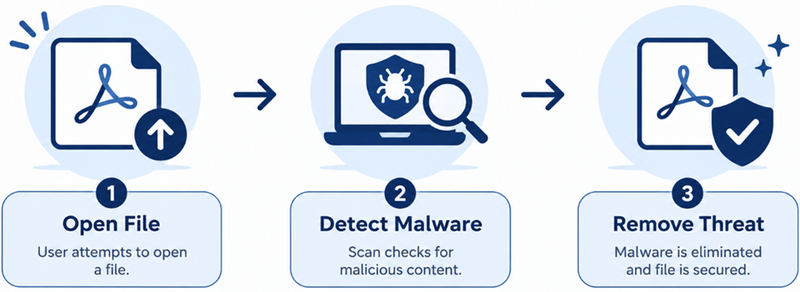
Malware Detection and Removal Workflow
Why Traditional File Upload Methods Fail at Scale
Here is the upload endpoint most teams ship first:
@app.post("/upload")
async def upload(file: UploadFile):
    content = await file.read()          # entire file in RAM
    if file.content_type not in ALLOWED:  # client-controlled header
        raise HTTPException(400)
    s3.put_object(Bucket=BUCKET, Key=file.filename, Body=content)  # user-controlled key
    return {"url": f"https://{BUCKET}.s3.amazonaws.com/{file.filename}"}  # public URL
It works on day one. Count the problems:
- Memory blowup. await file.read() loads the whole file into the API process. Ten concurrent 500 MB uploads and your container is out of memory.
- The API is a file proxy. Every byte crosses the network twice (client to API, API to S3). Your compute bill now scales with bandwidth, not business logic.
- Long-lived requests. Large uploads hold connections open for minutes, starving other requests and colliding with load balancer and gateway timeouts.
- Fragile retries. A dropped connection at 95% means starting over from zero.
- Spoofable validation. The type check trusts a header the attacker writes.
- Overwritable, guessable keys. Two users uploading report.pdf clobber each other, and anyone can enumerate URLs.
Horizontal scaling papers over the first four for a while, but you are paying for servers to do a job S3 does better. The fix is architectural, not a bigger instance.
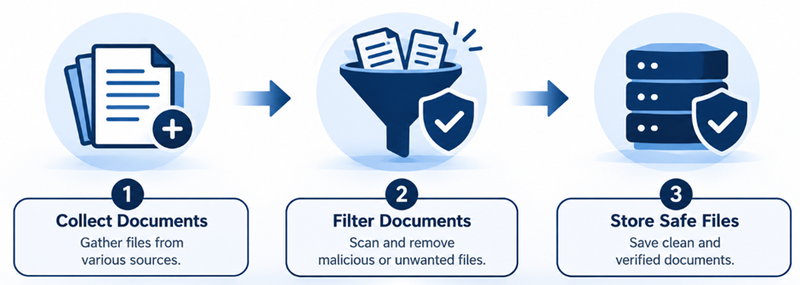
Document Filtering and Secure Storage Workflow
The reference architecture
The secure design rests on one idea: your API grants permission, S3 moves the bytes, and a worker decides what is trusted. No file is usable until it has passed verification.
It uses two private buckets. New uploads land in a quarantine bucket that nothing else reads from. Only after a background worker verifies a file does it move to the clean bucket, the only place your application serves files from.
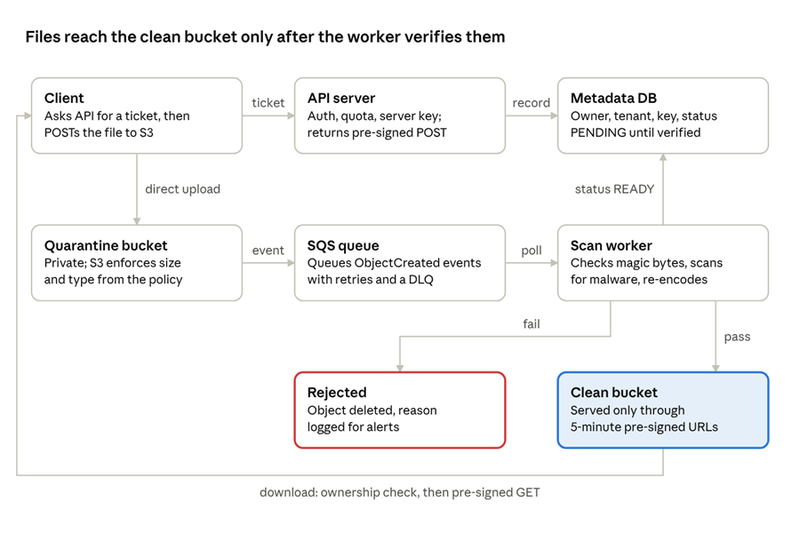
- secure upload pipeline · two buckets, one async worker
The API server never touches file bytes, so it stays fast and cheap regardless of upload size. Every arrow into the clean bucket passes through the worker, and every download passes through an ownership check.
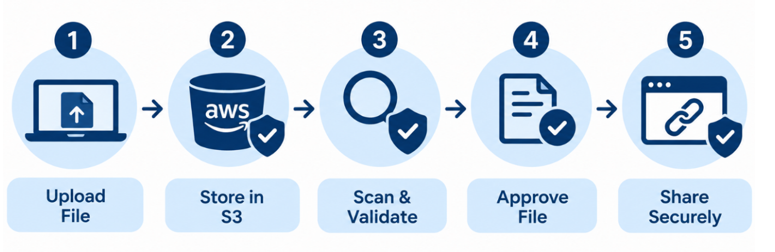
Secure File Upload Process: From Upload to Safe Sharing
How to Build a Secure S3 File Upload Pipeline
The examples use Python with FastAPI and boto3, but every pattern maps directly to Node, Go or Java SDKs.
Step 1: Harden the buckets before writing any code
Security starts in infrastructure, not in the handler. Configure both buckets (quarantine and clean) with:
- S3 Block Public Access enabled at the account and bucket level. No object should ever be public.
- Default encryption with SSE-KMS, so reads also require KMS permissions.
- A bucket policy that denies non-TLS requests (aws:SecureTransport = false).
- Lifecycle rules: expire quarantine objects after 24 hours and abort incomplete multipart uploads after a day, so abandoned uploads never pile up.
- Least-privilege IAM: the API role can only create upload URLs for the quarantine prefix; only the worker role can write to the clean bucket.
Step 2: Issue an upload "ticket" with a pre-signed POST
The client asks your API for permission to upload. The API authenticates the user, checks quota, generates the object key itself and returns a short-lived, tightly scoped upload policy.
Use pre-signed POST rather than pre-signed PUT. A POST policy lets S3 itself enforce a size range and an exact content type, so oversize uploads are rejected before a single byte lands in your bucket.
import uuid
from fastapi import HTTPException

ALLOWED_TYPES = {"application/pdf": "pdf", "image/png": "png", "image/jpeg": "jpg"}
MAX_BYTES = 5 * 1024 * 1024  # 5 MB

@app.post("/uploads")
async def create_upload(req: UploadRequest, user=Depends(current_user)):
    ext = ALLOWED_TYPES.get(req.content_type)
    if ext is None:
        raise HTTPException(400, "Unsupported file type")
    if req.size > MAX_BYTES:
        raise HTTPException(413, "File too large")
    enforce_quota(user)  # per-user daily count and total bytes

    file_id = uuid.uuid4().hex
    key = f"{user.tenant_id}/{user.id}/{file_id}.{ext}"  # server-controlled, never the user's filename

    db.files.insert(
        file_id=file_id, owner_id=user.id, tenant_id=user.tenant_id,
        key=key, original_name=req.filename[:255],  # stored as metadata only
        status="PENDING",
    )

    post = s3.generate_presigned_post(
        Bucket=QUARANTINE_BUCKET,
        Key=key,
        Fields={"Content-Type": req.content_type},
        Conditions=[
            {"Content-Type": req.content_type},
            ["content-length-range", 1, MAX_BYTES],
        ],
        ExpiresIn=300,  # 5 minutes
    )
    return {"file_id": file_id, "upload": post}
Note what the API checked here: the declared type and size. That is a fast first filter for honest clients, not a security control. The real enforcement happens at S3 (size) and in the worker (content).
Step 3: Let the client upload directly to S3
The browser or mobile app posts the file straight to S3 using the returned URL and fields. Your API never touches the bytes, so it stays fast regardless of file size. For files over roughly 100 MB, switch to multipart upload with pre-signed part URLs so that a dropped connection only retries one part.
Step 4: Validate and scan asynchronously
An S3 ObjectCreated event lands in an SQS queue, and a worker picks it up. The queue gives you retries and a dead-letter queue for free; the API request has long since returned.
MAGIC = {
    "pdf": [b"%PDF-"],
    "png": [b"\x89PNG\r\n\x1a\n"],
    "jpg": [b"\xff\xd8\xff"],
}

def process(key: str):
    record = db.files.get_by_key(key)
    head = s3.head_object(Bucket=QUARANTINE_BUCKET, Key=key)
    if head["ContentLength"] > MAX_BYTES:
        return reject(record, "size")

    # Read only the first bytes; never download the whole file to check its type
    first = s3.get_object(Bucket=QUARANTINE_BUCKET, Key=key, Range="bytes=0-15")["Body"].read()
    ext = key.rsplit(".", 1)[1]
    if not any(first.startswith(sig) for sig in MAGIC[ext]):
        return reject(record, "type_mismatch")

    if not malware_scan_clean(key):  # GuardDuty Malware Protection for S3, or ClamAV in a sandbox
        return reject(record, "malware")

    s3.copy_object(
        Bucket=CLEAN_BUCKET, Key=key,
        CopySource={"Bucket": QUARANTINE_BUCKET, "Key": key},
    )
    s3.delete_object(Bucket=QUARANTINE_BUCKET, Key=key)
    db.files.update(record.file_id, status="READY")
For images, go one step further and re-encode them (for example with Pillow) into a fresh file. Re-encoding strips metadata and destroys most polyglot payloads hidden inside otherwise valid images.
Step 5: Serve files through authorized, short-lived URLs
Downloads follow the same principle: no public URLs, ever. Check ownership and status first, then mint a URL that expires in minutes.
@app.get("/files/{file_id}/download")
async def download(file_id: str, user=Depends(current_user)):
    f = db.files.get(file_id)
    if f is None or f.tenant_id != user.tenant_id or not can_read(user, f):
        raise HTTPException(404)  # 404, not 403: don't confirm the file exists
    if f.status != "READY":
        raise HTTPException(409, "File is still processing")

    url = s3.generate_presigned_url(
        "get_object",
        Params={
            "Bucket": CLEAN_BUCKET,
            "Key": f.key,
            "ResponseContentDisposition": f'attachment; filename="{safe_name(f.original_name)}"',
        },
        ExpiresIn=300,
    )
    audit_log("file.download", user=user.id, file=file_id)
    return {"url": url}
Forcing Content-Disposition: attachment makes the browser download the file instead of rendering it, which shuts down a whole class of stored cross-site scripting through uploaded HTML or SVG. If you need inline previews, serve them from a separate, cookie-less domain.
Step 6: Make every file observable
The metadata record from Step 2 is your source of truth: owner, tenant, key, original name, size, status and timestamps. Add to it:
- Structured logs for every state change (requested, uploaded, rejected and why, ready, downloaded).
- CloudTrail data events on both buckets for an independent audit trail.
- Alerts on spikes in rejections, malware hits or per-user upload volume. A sudden jump is often the first sign of abuse.
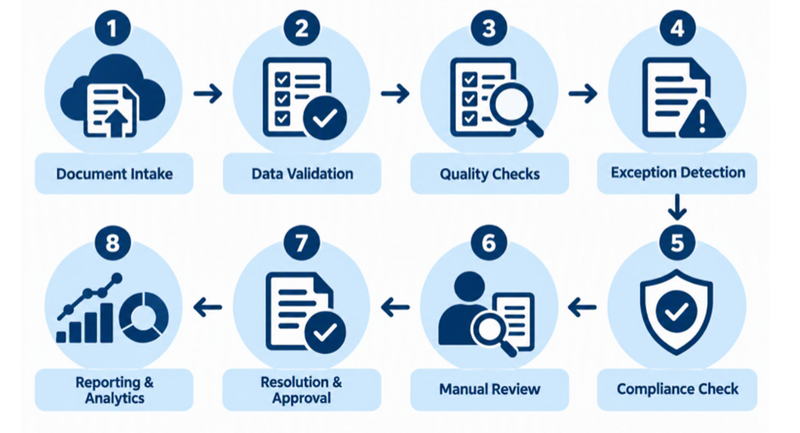
Document Validation & Compliance Workflow
Production Checklist for Secure File Uploads
Run through this before your upload feature goes to production:
- Block Public Access is on for every upload bucket
- Buckets are encrypted with SSE-KMS and deny non-TLS requests
- Object keys are generated by the server; user filenames are metadata only
- Upload URLs are pre-signed POST with content-length-range and a fixed Content-Type
- Upload and download URLs expire in minutes, not hours
- File type is verified by magic bytes in a worker, not by extension or header
- Files are scanned for malware before leaving quarantine
- Images are re-encoded; downloads use Content-Disposition: attachment
- Ownership and tenant are checked before any download URL is issued
- Per-user quotas and rate limits are in place
- Lifecycle rules expire quarantine objects and incomplete multipart uploads
- Every state change is logged, and alerts fire on rejection or volume spikes
Conclusion
A file upload looks like a single feature, but it is really a pipeline that crosses a trust boundary. The naive version, where your API reads the file and writes it to a public bucket, fails on security and scale at the same time.
The fix is a small set of principles applied consistently. Let S3 carry the bytes through pre-signed POST. Keep every new file in quarantine until a worker has verified its type and scanned it. Generate every key on the server. Grant access only through ownership checks and short-lived URLs. Record everything.
None of this is expensive to build on day one, and all of it is painful to retrofit after an incident. Design it in from the start, and your upload button stops being an open door and becomes a well-guarded one.